
Organizations issuing training certificates often begin with Canva due to its familiar design interface and low initial costs. However, teams managing ongoing training programs quickly discover Canva’s limitations for certificate operations at scale. When organizations switch from Canva to MixCertificate, they gain automated certificate generation, centralized record management, verification capabilities, and scalable workflows eliminating manual certificate creation bottlenecks.
Understanding when and how to switch from Canva to MixCertificate helps training teams, HR departments, and course creators make informed migration decisions. This guide explains Canva’s operational limitations for certificates, feature gains after switching to dedicated certificate software, and practical migration steps enabling smooth transitions without workflow disruption.
Why Teams Use Canva for Certificates
Organizations initially choose Canva for certificate creation due to several practical advantages. Canva provides intuitive drag-and-drop design interfaces familiar to users without graphic design expertise. Free and low-cost plans make Canva accessible to small teams and startups with limited budgets. Template libraries offer professional design starting points accelerating initial certificate creation.
Canva excels for one-off certificate needs. Creating occasional certificates for special events, single workshops, or small training cohorts works reasonably well through Canva’s design tools. Teams customize templates, add recipient names manually, export PDFs, and distribute certificates individually without significant operational burden when volumes remain low.
However, Canva functions as a general-purpose design platform rather than specialized certificate software. While capable of creating attractive certificate designs, Canva lacks automation, verification, record management, and scalability features essential for ongoing training operations. Organizations issuing certificates regularly or at growing volumes encounter operational friction requiring manual workarounds consuming increasing administrative time.
Limitations of Using Canva for Certificates at Scale
Manual Editing Requirements: Every certificate requires individual manual editing in Canva. Teams must open designs, type or paste recipient names, update dates, adjust achievement descriptions, and export files individually. Generating 50 certificates requires 50 separate manual editing sessions. This process doesn’t scale organizations issuing hundreds or thousands of certificates face unsustainable manual workload.
No Automation Capabilities: Canva provides no workflow automation triggering certificate generation from external systems. Learning management systems, HR platforms, or form submissions cannot automatically create Canva certificates. Teams must manually check completion lists, identify new certificate recipients, and process credentials individually creating operational bottlenecks and delivery delays.
Absent Verification Systems: Canva-generated certificates lack verification mechanisms validating credential authenticity. Recipients receive static PDF files without unique identifiers, QR codes, or verification portals. Employers or institutions verifying certificates must contact issuing organizations manually. This verification gap creates administrative burden and enables potential credential fraud.
No Centralized Record Management: Canva doesn’t maintain certificate issuance databases tracking who received which credentials when. Organizations must manually track certificates issued through spreadsheets or separate systems. Finding historical certificate records, reissuing lost credentials, or generating compliance reports requires manual data management increasing error risk and administrative overhead.
High Error Risk in Bulk Operations: Manual certificate creation through Canva introduces significant error potential. Typing recipient names incorrectly, using wrong dates, applying incorrect achievement descriptions, or distributing certificates to wrong recipients occurs frequently under manual workflows. Error correction requires recreating certificates and redistributing credentials consuming additional time while creating negative recipient experiences.
Why Switch from Canva to MixCertificate
Organizations switch from Canva to MixCertificate gaining operational capabilities addressing Canva’s fundamental limitations for certificate management at scale.
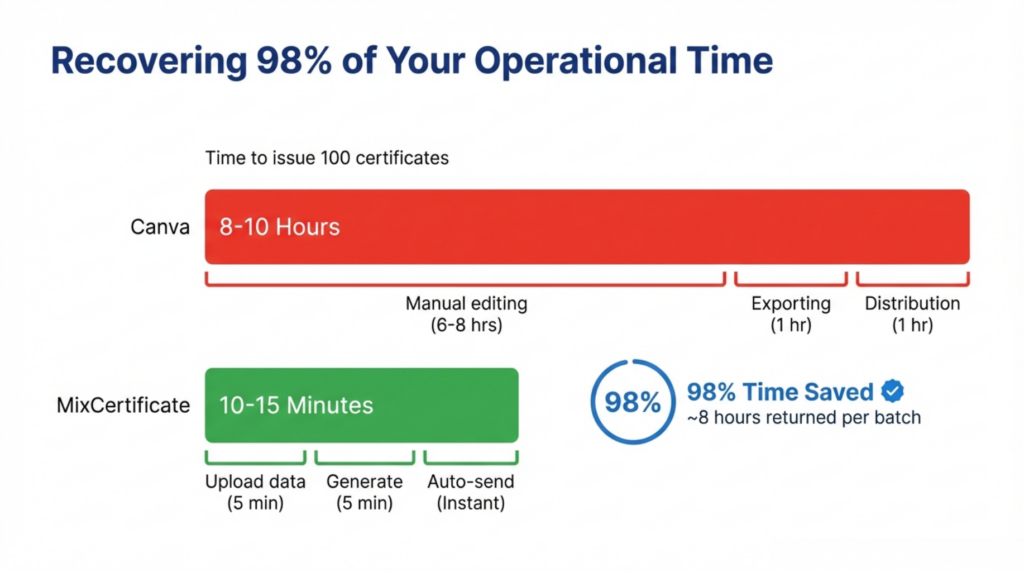
Automated Certificate Generation: MixCertificate eliminates manual certificate creation through automation. Upload recipient data once and generate hundreds or thousands of certificates simultaneously. Integration with learning management systems, HR platforms, and form tools triggers automatic certificate generation upon completion events. Automation that would take hours manually in Canva completes in minutes through MixCertificate.
Centralized Certificate Records: MixCertificate maintains comprehensive databases tracking all issued certificates. Search historical records, reissue lost certificates, generate compliance reports, and audit certificate distribution without manual spreadsheet management. Centralized record-keeping ensures organizational certificate data remains accessible and auditable supporting compliance requirements and operational efficiency.
Verification and Tracking: Every MixCertificate credential includes unique verification through QR codes or verification portals. Recipients, employers, and institutions verify certificate authenticity instantly without contacting issuing organizations. Verification systems reduce administrative burden while protecting credential integrity and organizational reputation.
Consistent Branding: MixCertificate templates ensure consistent organizational branding across all certificates. Upload organizational logos, define brand colors, establish standard layouts applying automatically to every generated certificate. Brand consistency that requires manual attention in Canva occurs automatically through MixCertificate templates.
Scalable Workflows: MixCertificate workflows scale effortlessly from dozens to thousands of monthly certificates without proportional workload increases. Organizations experiencing growth maintain certificate operations through automation rather than hiring additional administrative staff. Scalability supporting organizational growth represents fundamental capability Canva cannot provide.
Feature Gains After Switching
| Feature | Canva | MixCertificate |
|---|---|---|
| Bulk Issuance | Manual one-by-one editing | Automated bulk generation from data files |
| Automation | None – fully manual | LMS, HR, form integration triggers |
| Verification | No verification capability | QR codes + verification portals |
| Record Management | Manual external tracking | Centralized database with search |
| Error Risk | High – manual data entry | Minimal – automated data application |
| Time for 100 Certificates | 8-10 hours manual work | 10-15 minutes automated |
| Scalability | Linear time increase | Consistent regardless of volume |
| Compliance Reporting | Manual spreadsheet compilation | Automated report generation |
This comparison illustrates operational transformation when organizations switch from Canva to MixCertificate. Features impossible through Canva become standard capabilities through dedicated certificate software designed specifically for training operations.
How to Switch from Canva to MixCertificate
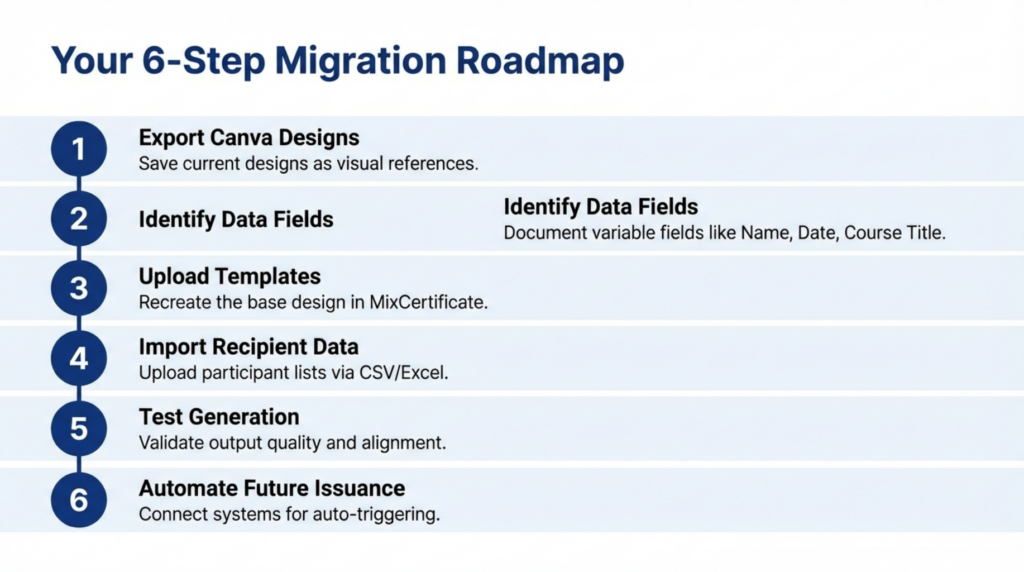
Export Canva Certificate Designs: Save current Canva certificate designs as high-resolution images or PDFs. These serve as design references when creating MixCertificate templates. Note specific design elements including fonts, colors, logo placement, and layout structures for template recreation.
Identify Certificate Data Fields: Document which information varies across certificates recipient names, course titles, completion dates, instructor names, or custom fields. Understanding variable data ensures proper MixCertificate template configuration supporting all required certificate variations.
Upload or Recreate Templates in MixCertificate: Upload existing Canva designs as background images then add variable text fields in MixCertificate template editor. Alternatively, recreate designs using MixCertificate’s template builder matching Canva visual styling. MixCertificate supports custom fonts, logos, and branding elements replicating existing certificate aesthetics.
Import Recipient Data: Prepare recipient data in spreadsheet format with columns for names, achievement details, dates, and other variable fields. Import spreadsheets into MixCertificate mapping columns to template fields. Data import replaces manual Canva editing enabling bulk generation.
Test Certificate Generation: Generate test certificates using sample data validating template accuracy, data mapping correctness, and output quality. Review test certificates confirming visual consistency with previous Canva designs and data accuracy before production generation.
Automate Future Issuance: Configure integrations connecting MixCertificate to learning platforms, HR systems, or form tools triggering automatic certificate generation. Establish workflows eliminating manual certificate processing for future training completions. Automation setup completes migration enabling ongoing operational efficiency gains.
Who Should Switch from Canva to MixCertificate?
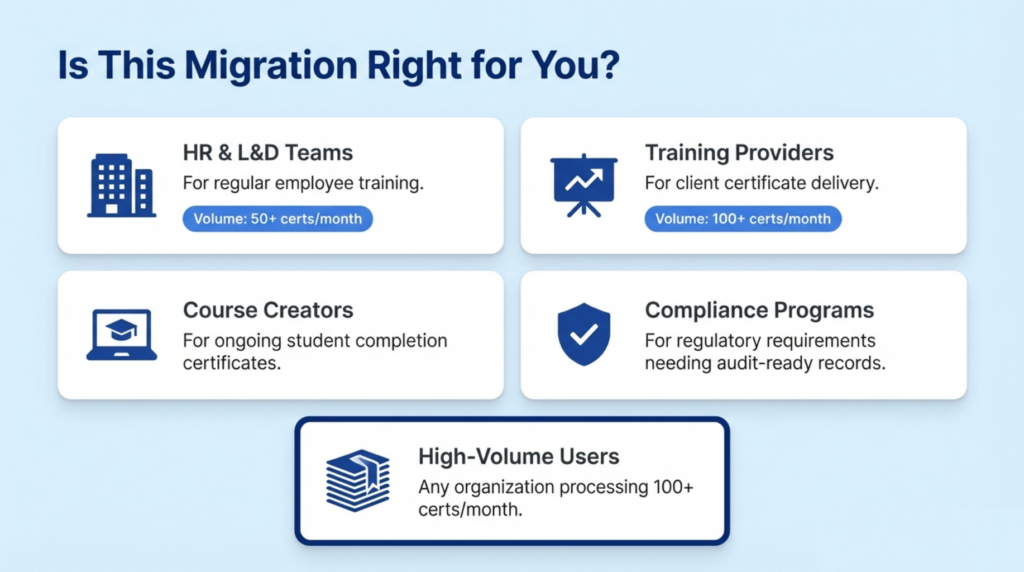
HR & L&D Teams: Human resources and learning development departments issuing employee training certificates monthly or quarterly benefit significantly from switching. Automated employee certificate generation reduces administrative burden while maintaining compliance documentation supporting audit requirements.
Training Providers: Organizations delivering ongoing training programs to clients or public audiences gain operational efficiency through MixCertificate automation. Professional certificate delivery with verification enhances service quality while reducing delivery costs and timeframes.
Course Creators: Online course platforms and educational creators issuing completion certificates to students benefit from automated delivery. Instant certificate availability upon course completion improves student satisfaction while eliminating creator administrative work.
Compliance-Driven Programs: Industries requiring regulatory training compliance certificates gain audit-ready record systems and verification capabilities. Healthcare, finance, manufacturing, and government training operations requiring documented compliance benefit from centralized certificate databases and automated reporting.
High-Volume Certificate Issuance: Any organization issuing more than 50 certificates monthly experiences clear ROI from switching. Time savings, error reduction, and scalability gains justify migration effort and platform costs for organizations with regular certificate requirements.
Pros and Cons of Switching from Canva
Advantages:
- Dramatic time savings 10 hours to 15 minutes for 100 certificates
- Elimination of manual data entry errors
- Automated verification protecting credential integrity
- Centralized records supporting compliance and audits
- Scalability supporting organizational growth
- Professional automated workflows enhancing organizational operations
- Integration capabilities connecting existing systems
Considerations:
- Platform subscription costs versus Canva’s free/low-cost model
- Initial template recreation and setup time investment
- Learning curve adapting to new certificate software interface
- Change management communicating new workflows to teams
- Data migration ensuring historical records transfer appropriately
Organizations experiencing operational pain from Canva’s manual limitations typically find switching advantages significantly outweigh migration considerations. Time savings alone often justify platform costs within first month of operation.
Frequently Asked Questions
Why should I switch from Canva to MixCertificate?
Organizations should switch from Canva to MixCertificate when manual certificate creation becomes operationally unsustainable. MixCertificate provides automated bulk generation, verification systems, centralized record management, and scalable workflows impossible through Canva. Teams issuing 50+ certificates monthly typically achieve immediate ROI through time savings and error reduction justifying platform migration.
Is MixCertificate better than Canva for training certificates?
MixCertificate is purpose-built for training certificate operations while Canva is a general design platform. For ongoing training programs requiring regular certificate issuance, MixCertificate provides superior automation, verification, record management, and scalability. Canva works adequately for occasional one-off certificates but cannot match MixCertificate’s operational capabilities for systematic training operations.
Can I migrate Canva certificate designs to MixCertificate?
Yes, organizations can migrate existing Canva designs when they switch from Canva to MixCertificate. Upload Canva designs as template backgrounds in MixCertificate then add variable text fields, or recreate designs using MixCertificate’s template builder. Both approaches enable maintaining consistent certificate branding through migration ensuring visual continuity for recipients.
How long does it take to switch from Canva to MixCertificate?
Complete migration typically requires 2-4 hours including template creation, data import configuration, testing, and automation setup. Organizations can begin generating certificates through MixCertificate within days of migration decision. Time investment is minimal compared to ongoing time savings hundreds of hours annually for organizations issuing regular certificates.
Is MixCertificate suitable for small teams?
Yes, MixCertificate serves organizations of all sizes including small teams. Free and starter plans accommodate small-scale certificate needs while providing automation and verification capabilities unavailable in Canva. Small teams benefit from time savings and professional workflows even at lower certificate volumes. MixCertificate scales with organizational growth supporting long-term certificate requirements.
Does MixCertificate support bulk certificate generation?
Yes, bulk certificate generation represents core MixCertificate functionality. Upload spreadsheets containing hundreds or thousands of recipients and generate all certificates simultaneously. Bulk processing that requires hours of manual work in Canva completes in minutes through MixCertificate automation. Bulk capabilities enable organizations to scale certificate operations without proportional workload increases.
Conclusion
Explore MixCertificate Pricing Plans for your Organizations currently using Canva for certificates face operational constraints limiting scalability and efficiency. Manual editing requirements, absent automation, missing verification systems, and inadequate record management create growing administrative burden as certificate volumes increase. When teams switch from Canva to MixCertificate, they gain purpose-built certificate software designed specifically for training operations.
MixCertificate provides automated bulk generation, verification through QR codes, centralized certificate databases, and workflow integrations eliminating manual processing. Feature gains include dramatic time savings, error reduction, professional verification systems, compliance-ready records, and unlimited scalability. Organizations issuing regular training certificates benefit immediately from operational transformation.
Migration from Canva to MixCertificate requires minimal time investment typically several hours for complete setup while delivering hundreds of hours in annual time savings. For HR teams, L&D departments, training providers, and course creators managing ongoing certificate programs, switching represents clear operational improvement supporting organizational efficiency and growth.
