
Introduction
Organizations creating certificates frequently evaluate MixCertificate vs Google Docs when deciding how to produce professional credentials efficiently. This comparison arises because Google Docs is often the first tool used for certificates, while MixCertificate represents the automation path organizations adopt as programs grow.
Google Docs appeals to beginners and small teams because it offers free document creation with no technical barriers. Users can design certificate templates, personalize them for recipients, and export professional PDFs without additional software or budget approval.
As certificate volumes increase beyond occasional issuance to regular production for dozens or hundreds of recipients, Google Docs becomes operationally limiting. Teams begin searching for MixCertificate vs Google Docs because manual document editing cannot scale to meet demands for automation, verification, accuracy, and centralized certificate management.
This guide explains the MixCertificate vs Google Docs difference by clarifying what each tool does well, where their purposes diverge, and when moving from manual documents to certificate software becomes necessary.
Manual Documents vs Certificate Platforms
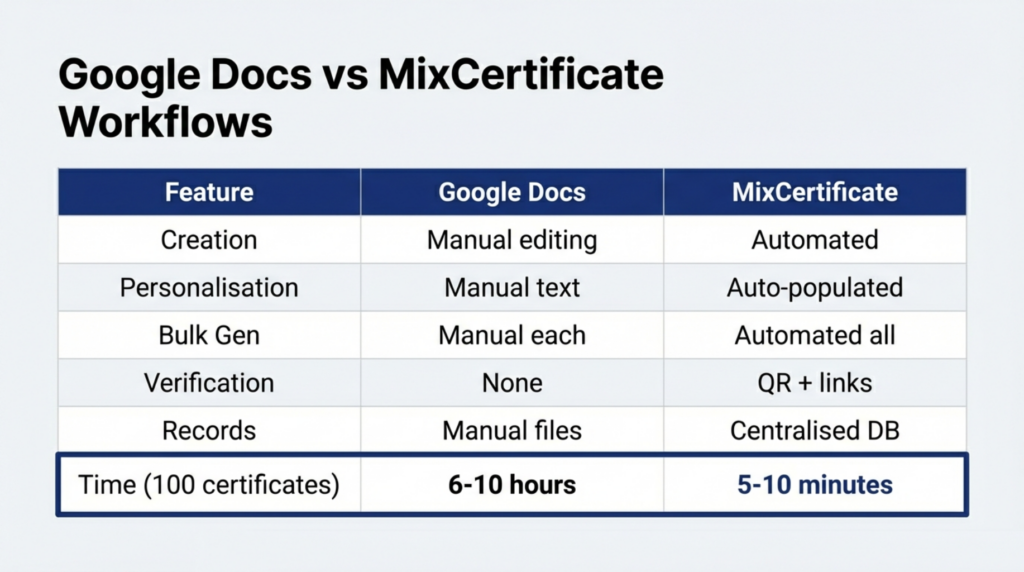
Understanding MixCertificate vs Google Docs starts with recognizing category differences.
Google Docs is built for collaborative document creation. It excels at writing, editing, sharing, and version control across teams. Certificates created in Google Docs are treated as documents rather than credentials tied to data, identity, or verification.
Certificate platforms like MixCertificate address challenges that document editors cannot solve. They automate certificate generation from recipient data, embed verification mechanisms, store issuance records centrally, reduce errors, and connect with learning or event systems.
Organizations compare MixCertificate vs Google Docs not because both tools serve the same role, but because certificate programs naturally evolve from manual processes to automated systems.
What Is MixCertificate?
MixCertificate is a certificate automation platform designed for organizations that have outgrown manual document workflows.
In the MixCertificate vs Google Docs comparison, MixCertificate represents operational maturity. Organizations design certificate templates once, then automatically generate personalized certificates in bulk using CSV uploads or system integrations.
Common use cases include:
-
Corporate training completion certificates
-
Compliance and regulatory documentation
-
Online course achievements
-
Event participation certificates
-
Professional credential issuance
MixCertificate focuses on automation and verification. Certificates include QR codes or verification links that allow instant authenticity checks. All issued certificates are stored in a centralized system, supporting audits, replacements, and compliance tracking.
These capabilities address operational needs that Google Docs cannot support once certificate issuance becomes routine.
What Is Google Docs?
Google Docs is a cloud-based document editor used for creating and collaborating on text-based files, including certificates.
In the MixCertificate vs Google Docs discussion, Google Docs is the entry-level option. Users create certificate templates, manually replace recipient details, export PDFs, and distribute them manually.
Google Docs strengths include free access, ease of use, cloud storage, and real-time collaboration. These advantages make it ideal for beginners, small teams, and one-time certificate needs.
However, Google Docs lacks automation, verification, and structured record management, which limits its usefulness as certificate volumes grow.
MixCertificate vs Google Docs: Key Differences
| Feature | Google Docs | MixCertificate |
|---|---|---|
| Tool Type | Document editor | Certificate platform |
| Certificate Creation | Manual editing | Automated generation |
| Personalization | Manual text replacement | Data-driven fields |
| Bulk Issuance | Not native | Fully automated |
| Verification | None | QR codes and verification pages |
| Record Management | Manual storage | Centralized database |
| Distribution | Manual | Automated email delivery |
| Error Risk | High | Very low |
| Scalability | Poor | Excellent |
This comparison highlights why MixCertificate vs Google Docs is fundamentally about automation versus manual effort.
Scale, Accuracy, and Time Investment
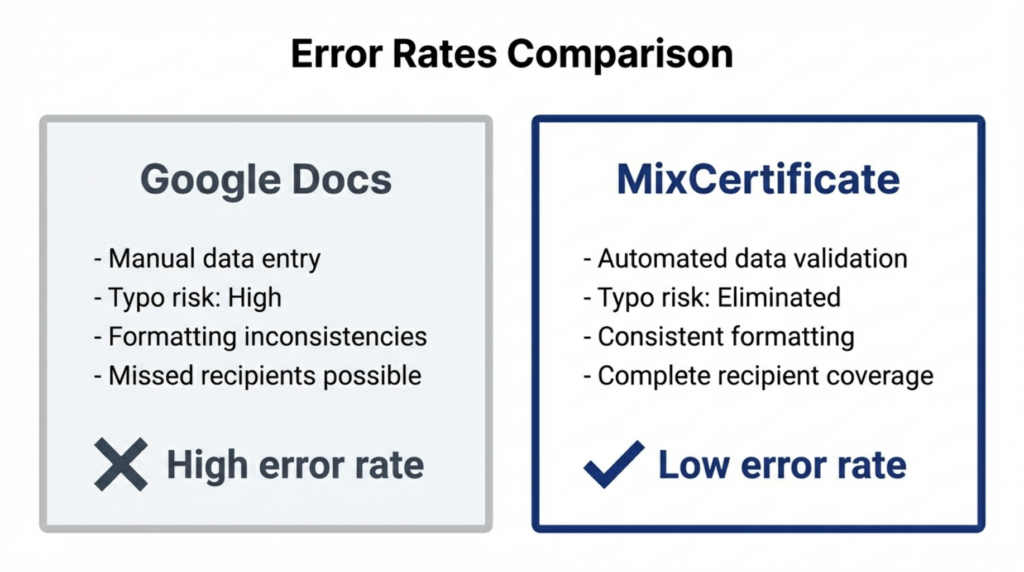
The most significant difference in MixCertificate vs Google Docs appears as certificate volumes grow.
With Google Docs, every certificate requires manual editing. Users open templates, replace names and dates, check formatting, export PDFs, rename files, and send emails individually. Each step repeats for every recipient.
MixCertificate eliminates this repetition. Organizations upload recipient data once. Certificates are generated, verified, delivered, and recorded automatically.
Error reduction is another advantage. Manual editing in Google Docs often introduces spelling mistakes, incorrect dates, or missing recipients. MixCertificate validates data before generation, ensuring consistency and accuracy.
Time comparisons illustrate the gap clearly. Creating 100 certificates in Google Docs can take 15 to 25 hours. The same task in MixCertificate takes about 10 to 15 minutes after setup.
These inefficiencies are why organizations research MixCertificate vs Google Docs when manual workflows become unsustainable.
Verification and Credential Trust
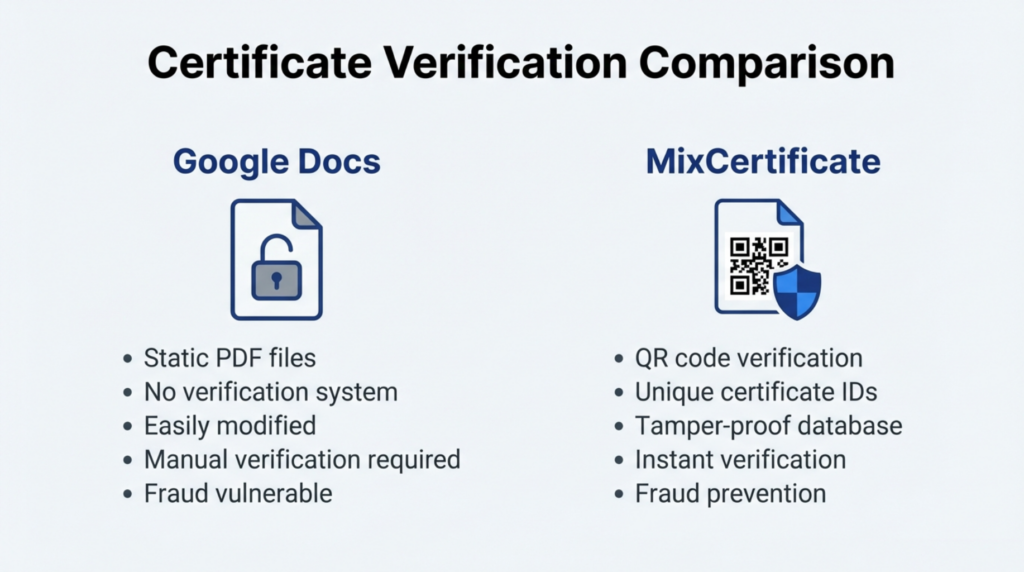
Verification is a critical difference in the MixCertificate vs Google Docs comparison.
Certificates created in Google Docs are static PDFs. Anyone can edit or duplicate them, and there is no built-in method for third parties to verify authenticity.
MixCertificate solves this with embedded verification. Each certificate includes a unique verification ID or QR code that links to an online verification page. Employers or institutions can instantly confirm authenticity without contacting the issuer.
For compliance training, professional certification, and formal education, verification is not optional. This requirement alone drives many organizations away from Google Docs toward MixCertificate.
Pricing and Total Cost of Ownership
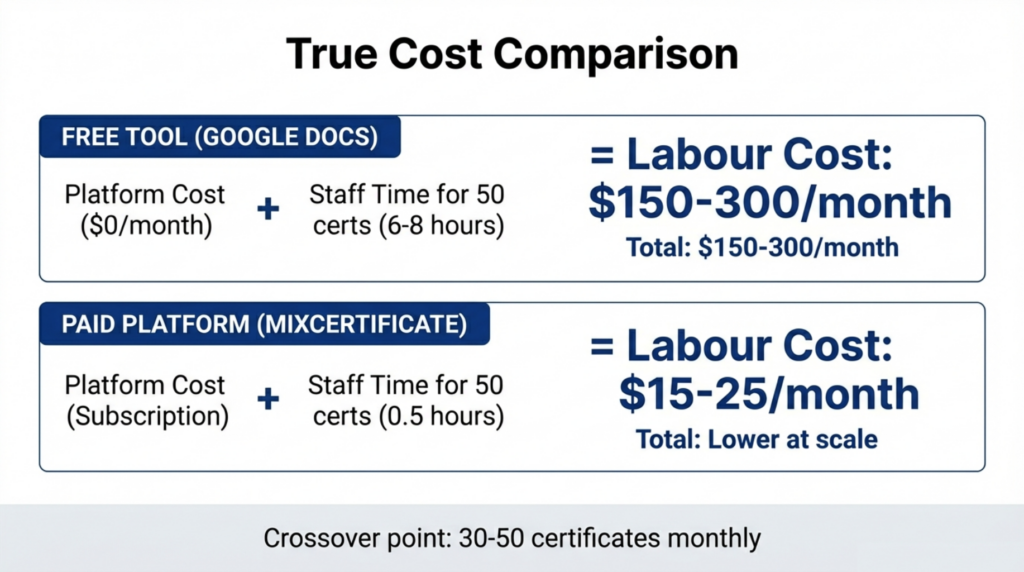
At first glance, Google Docs appears cheaper because it is free. However, MixCertificate vs Google Docs cost comparisons must include staff time.
Manual certificate creation consumes hours each month. Even small programs issuing 50 certificates may spend 8 to 12 hours on editing, exporting, and distribution.
MixCertificate charges a subscription fee but dramatically reduces labor. For many organizations, the time saved offsets platform costs once certificate issuance exceeds 30 to 50 per month.
Evaluating total cost of ownership rather than tool pricing alone reveals why automation becomes cost-effective quickly.
Pros and Cons Summary
MixCertificate
Pros
-
Automated bulk certificate generation
-
Built-in verification and fraud prevention
-
Centralized records for audits
-
Significant time savings
-
High scalability
-
Integration with LMS and event platforms
Cons
-
Subscription cost
-
Initial setup effort
-
Not ideal for very small programs
Google Docs
Pros
-
Free access
-
Familiar interface
-
Flexible template editing
-
Easy collaboration
-
Good for small-scale use
Cons
-
No automation
-
No verification
-
High error risk
-
Poor scalability
-
Manual record management
Who Should Choose MixCertificate vs Google Docs?
Choose Google Docs if you issue fewer than 20 certificates per month and value free access over efficiency.
Choose MixCertificate if you issue certificates regularly, need verification, manage compliance, or want to eliminate manual work.
High-volume and verification-dependent programs should choose MixCertificate regardless of cost considerations.
This practical distinction defines the MixCertificate vs Google Docs decision.
Frequently Asked Questions (FAQs)
What is the difference between MixCertificate and Google Docs?
MixCertificate is a specialized certificate automation platform providing bulk generation, verification infrastructure, centralized record management, and workflow automation for systematic certificate operations. Google Docs is a general document editor enabling manual certificate creation through template editing and PDF export. MixCertificate optimizes for operational efficiency and scale. Google Docs optimizes for free document creation and collaboration. Organizations often start with Google Docs for template design, then migrate to MixCertificate for automated production.
Can Google Docs generate certificates in bulk?
Google Docs lacks native bulk certificate generation capabilities. Users must manually edit each certificate individually, replacing placeholder text with recipient information, then export and distribute separately. While some users employ mail merge add-ons, these still require manual triggering, downloading, organizing, and distribution for each batch. True bulk automation as MixCertificate provides involves automatic personalization, generation, verification embedding, distribution, and record-keeping without manual intervention per certificate.
Is Google Docs suitable for training certificates?
Google Docs works adequately for occasional training certificates with small recipient counts where free access matters more than operational efficiency. However, regular training programs issuing certificates monthly or weekly to multiple participants benefit from MixCertificate automation eliminating manual work, providing verification infrastructure, and maintaining centralized compliance records. Verification requirements for professional training particularly favor certificate platforms over document editors.
When should I move from Google Docs to certificate software?
Move from Google Docs to MixCertificate when certificate volumes exceed 20-30 monthly, making manual workflows time-prohibitive; verification infrastructure becomes necessary for credential trust; centralized records are required for compliance or audits; error rates from manual editing damage credibility; or staff time invested in manual certificate creation exceeds platform subscription costs. The migration typically becomes necessary within 3-6 months for programs issuing certificates regularly.
Which is better for large-scale certificate issuance?
MixCertificate significantly outperforms Google Docs for large-scale certificate issuance through automated bulk generation, verification infrastructure, centralized management, and workflow efficiency. Organizations issuing hundreds or thousands of certificates monthly cannot sustain Google Docs manual workflows consuming excessive staff time and creating high error rates. Certificate platforms like MixCertificate become operationally necessary rather than optional improvements once certificate volumes exceed regular production serving dozens of recipients.
Conclusion
The MixCertificate vs Google Docs comparison reflects two stages of certificate program growth. Google Docs works well as a free starting point for small-scale issuance. MixCertificate provides the automation, verification, and efficiency required for mature programs.
Many successful certificate programs use both tools sequentially rather than choosing between them permanently. Organizations employ Google Docs for initial template design and small-scale testing, then migrate finished templates to MixCertificate for automated operational production once volumes, verification requirements, or time investment justify platform adoption. This progression recognizes that free document editors and specialized certificate platforms serve complementary purposes in comprehensive certificate workflows.
Explore MixCertificate Pricing Plans for your Organizations and Understanding this progression helps organizations make appropriate tool selections matching their current operational stage. Early-stage certificate programs benefit from Google Docs enabling template experimentation without financial investment. Mature certificate programs benefit from MixCertificate providing automation, verification, and efficiency that manual document editing cannot deliver.
