
MixCertificate Vs Canva
Canva alternative that actually delivers every time
Stop wasting hours on manual certificate creation. MixCertificate generates, delivers, and verifies thousands of professional certificates in minutes not days. Purpose-built for institutions that need scale, security, and measurable brand visibility.
Top reasons businesses trust MixCertificate over Canva
95% Faster Certificate Generation
Generate 1,000 personalized certificates in under 10 minutes with simple CSV upload. What takes 4-5 hours of tedious copy-paste work in Canva takes just minutes with MixCertificate.
More powerful than design tools
Bulk generation with automated email delivery, secure QR verification, LinkedIn integration, unique URLs per certificate, white-label portal on your domain, and real-time analytics.
Native intelligent integrated verification
Every certificate includes QR code verification, cryptographically secure IDs, and a branded verification portal on your domain. Employers verify credentials instantly without calling your office.
MixCertificate vs Canva: Side-by-side comparison
See exactly what you’re missing with design tools
| Feature | Canva | MixCertificate |
|---|---|---|
| Bulk Generation | Manual, one-by-one | 1,000+ in minutes |
| Auto Delivery | Individual sending | One-click email |
| QR Verification | None | Built-in secure |
| Unique URLs | Static PDFs | Each certificate |
| LinkedIn Integration | Manual upload | One-click add |
| White-Label Portal | Limited | Your domain |
| Analytics | None | Real-time tracking |
| API | Not certificate-focused | Full REST API |
| Security | Basic PDF only | Military-grade |
| Verification | Manual requests | Automated 24/7 |
| Cost/Certificate | ₹15-50+ | ₹5-10 |
| Time (1,000 certs) | 8-10 hours | <10 minutes |
| Support | Email only (free) | Chat, Email, Priority |
Bulk Certificate Generation: The Biggest Difference
Canva Process
- Time Required: Max 3-5 hours
- 1. Design template (1-2 hours)
- 2. Duplicate for each recipient
- 3. Manually type each name
- 4. Add details individually
- 5. Download each PDF
- 6. Email each certificate manually
- 7. Handle verification requests forever
Results:
- Time: 4-5 hours for 500 certs , Cost: ₹20-50+ per certificate , Effort: Intensive manual work , Verification: Manual, ongoing
MixCertificate Process
- Time Required: Max 10-15 minutes
- 1. Upload CSV file with recipient data
- 2. Select certificate template
- 3. Map columns to fields
- 4. Click "Generate All"
- 5. 1,000 certs created in 10 minutes
- 4. Auto-delivery to all recipients
Results:
- Time: 10 minutes for 1,000 certs , Cost: ₹5-10 per certificate , Effort: Fully automated , Verification: Built-in, automatic
Verification & Authenticity: Essential for Credibility
Canva PDFs can be duplicated. MixCertificate certificates are cryptographically secure and instantly verifiable.
Canva
No Verification System
Result : Employers call your office constantly. Staff waste hours on manual verification. No way to track engagement or sharing.

MixCertificate
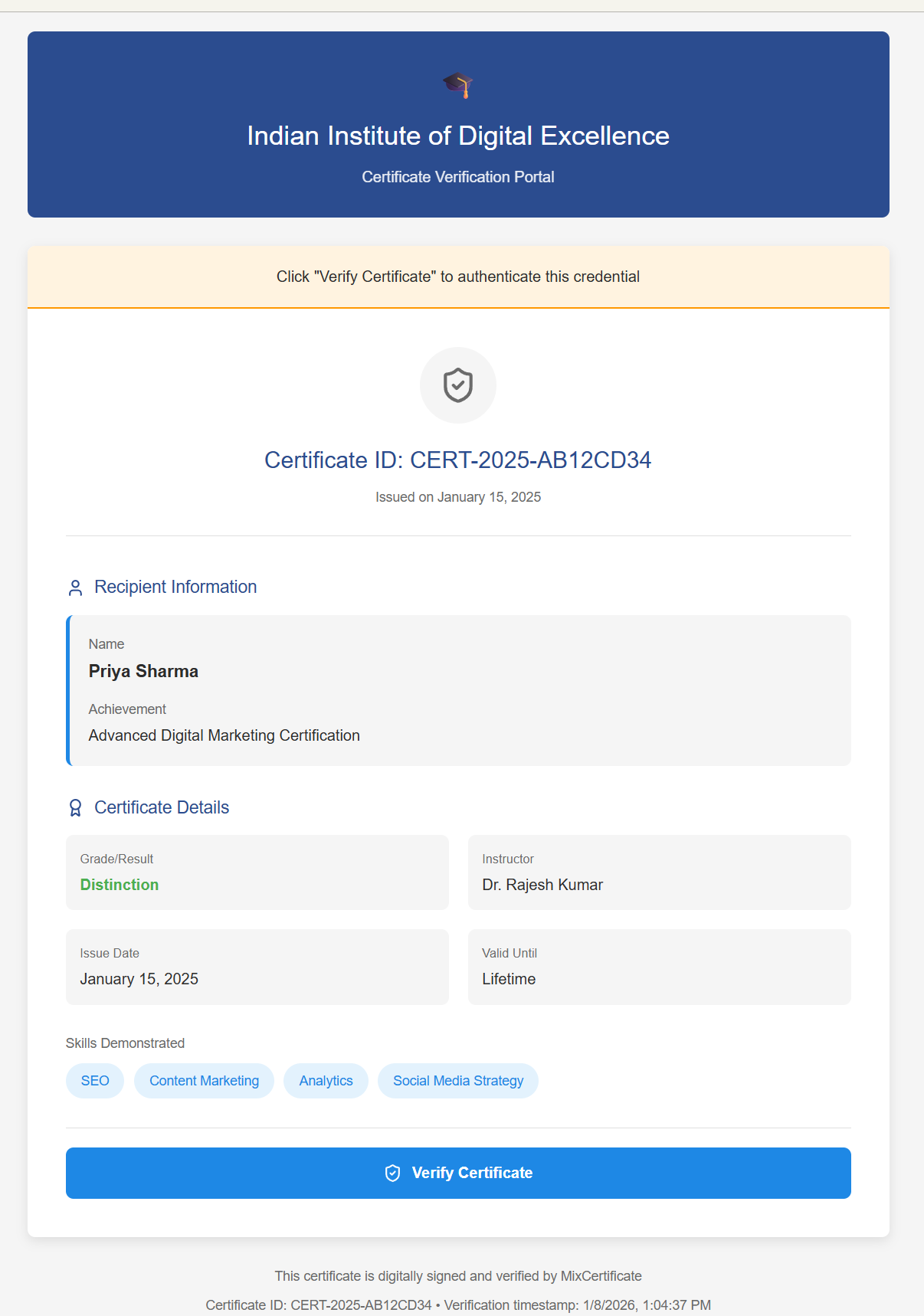
Built-in Verification System
- Each certificate gets a unique verification ID
- QR code automatically added to every certificate
- Public verification page hosted securely
- Anyone can scan QR or visit URL to verify
- Shows issuer, recipient, date, and certificate details
- Tamper-proof blockchain-style records
- Lifetime verification (never expires)
Result : Verification workload drops to zero. Modern professional presentation. Measurable brand visibility.
Pricing that makes MixCertificate the smarter alternative
Canva pricing is mostly hidden. Mixcertificate keeps costs clear, affordable, and just as powerful.
Canva
-
Design tools
-
Brand kit
-
Premium templates
-
Cloud storage
-
Download as PDF
NOT Included:
-
No bulk generation
-
No auto-delivery
-
No verification
-
No unique URLs
-
No LinkedIn integration
-
No analytics
-
No API
Mixcertficate
-
5,000 certificates annually
-
Bulk generation & auto-delivery
-
QR verification system
-
Unique URLs per certificate
-
White-label portal
-
LinkedIn integration
-
Real-time analytics
-
API access
-
Custom templates
-
Priority support
Who Should Choose Which Tool?

Choose MixCertificate if you:
Canva is Fine for: Small clubs, personal projects, informal recognition, creative experimentation However MixCertificate is Perfect for : Colleges, universities, corporate training, certification bodies, event organizers
#MixCertificate
Common Questions About MixCertificate vs Canva
Frequently Asked Questions
MixCertificate is a comprehensive digital bulk certificate generation, verification and management platform. It allows businesses, educational institutions, event organizers, and communities to efficiently create, customize, distribute, and verify digital certificates.
MixCertificate provides an intuitive user interface to design personalized certificate templates. Users input recipient information, and the platform generates certificates. Certificates can be delivered via automated email or secure download links.
MixCertificate allows you to export generated certificates in widely used formats such as PDF, JPEG, and PNG. This ensures flexibility for recipients who may want to store, print, or share their certificates in different ways.
It’s under development. MixCertificate will be supporting seamless LinkedIn certificate verification. You can add your certificates to your LinkedIn profile, allowing others to verify your achievements directly through the platform.
Yes, MixCertificate allows you to send certificates to multiple recipients simultaneously using email. This feature streamlines the process of distributing certificates to a large number of recipients.
Certainly, MixCertificate provides options for customizing the email content and design. You can add personalized messages, branding elements, and any additional information you wish to include.
MixCertificate offers a streamlined process for bulk certificate generation through CSV import. You can prepare a CSV file with recipient data, including names and achievements, and upload it to the platform. The system will then automatically generate certificates for each recipient.
Absolutely! MixCertificate offers a range of customizable templates. You can personalize certificates with recipient names, dates, achievements, and more to reflect your brand identity.
MixCertificate is designed to handle bulk sending efficiently. However, it’s advisable to review the email service provider’s guidelines to ensure your emails are delivered successfully without any limitations on the number of certificates sent.
Yes, MixCertificate excels in bulk certificate generation. Whether it’s for large training sessions, events, or classes, the platform streamlines the process, saving you time and effort.
MixCertificate incorporates a built-in Verification API that enables third-party validation. Recipients and employers can easily verify the authenticity of certificates for added credibility.
MixCertificate enhances efficiency by automating certificate processes. It adds credibility with verification features and offers personalized certificate designs, ensuring recipients cherish their achievements.
Yes, MixCertificate features role-based access control. Administrators, issuers, and recipients have tailored access levels, ensuring secure and controlled interactions.
Absolutely, MixCertificate ensures a seamless experience on desktops, tablets, and mobiles. The responsive design guarantees certificates look and function flawlessly on all devices.
To get started, simply sign up for an account on the MixCertificate platform. You’ll gain access to the user-friendly dashboard and all its powerful features.
Yes, MixCertificate offers dedicated customer support to assist with inquiries, troubleshooting, and providing guidance for maximizing the platform’s potential.
This is under development and only available in commerce plan.
Yes, MixCertificate offers the option you feature for you customers to pay for and download certificates without any watermarks.
You can watermark the image if you want a payment to be done before download.
This feature can be accesses from project or using API.