
Introduction
Many training teams begin their certificate journey with familiar design tools like Canva, Adobe Illustrator, or PowerPoint. These platforms feel accessible and seem perfectly adequate for creating professional-looking certificates. However, as programs grow and compliance requirements increase, the limitations of design tools become painfully apparent.
The certificate software vs design tools debate surfaces when organizations realize that manual certificate creation doesn’t scale. What works for 20 certificates per month becomes unsustainable at 200, and completely impossible at 2,000. This comparison examines the functional differences, automation capabilities, and compliance features that distinguish certificate software from design tools.
This guide explores when design tools remain appropriate, where they fall short, and how specialized certificate platforms address scalability and compliance challenges that general-purpose design software cannot solve.
Definitions: Certificate Software vs Design Tools
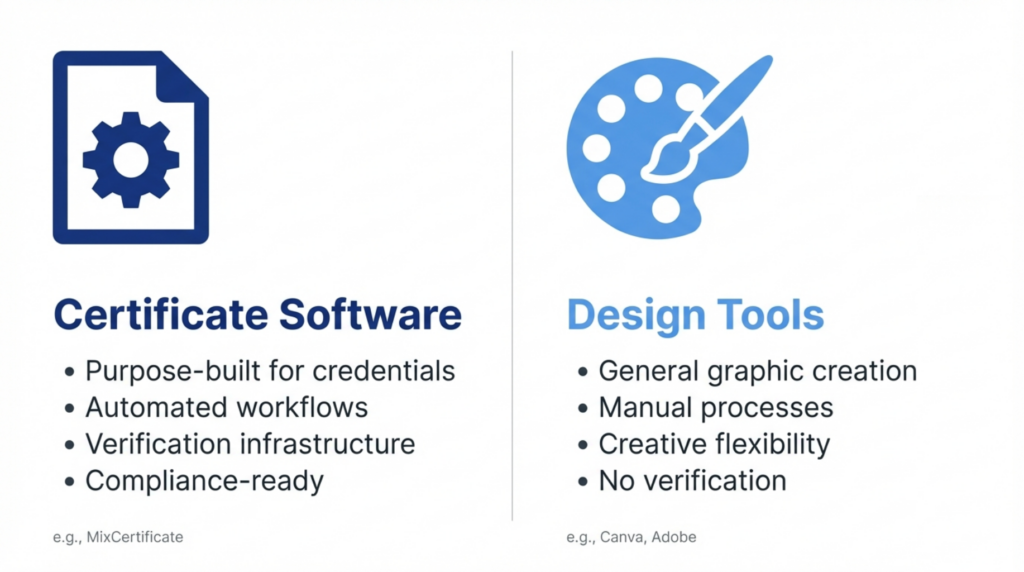
Understanding the fundamental difference between these categories helps clarify why organizations eventually migrate from one to the other.
Certificate software refers to specialized platforms built specifically for issuing, managing, and verifying digital credentials. These systems automate certificate generation, integrate with learning management systems, maintain verification databases, and provide compliance-ready record keeping. MixCertificate represents this category as a dedicated platform designed exclusively for credential management workflows.
Design tools encompass general-purpose graphic design applications used to create visual content. Canva, Adobe Illustrator, PowerPoint, and similar platforms excel at producing attractive graphics but lack purpose-built features for certificate automation, data integration, or credential verification.
The core distinction lies in purpose. Design tools create individual visual assets through manual processes. Certificate software manages credential lifecycles through automated workflows. Both can produce attractive certificates, but only one can do so at scale with compliance safeguards.
How Design Tools Are Used for Certificates
Training teams gravitate toward design tools because they already own the software and understand the interface. The workflow appears straightforward at small scale.
A typical design tool certificate process involves creating a template with placeholder text for names, dates, and course information. For each certificate, someone manually opens the template, replaces placeholders with learner data, exports a PDF, and sends it via email. With 10 or 20 certificates, this feels manageable.
Organizations use Canva for quick online course completions, PowerPoint for internal training certificates, and Adobe Illustrator for higher-end credentials. These tools offer excellent design flexibility and familiar interfaces. Teams appreciate the creative control and the ability to match exact brand guidelines without technical barriers.
However, this manual approach hides future problems. Each certificate requires individual attention, quality control becomes inconsistent, and tracking who received which certificate relies on spreadsheets or memory. The process works until it doesn’t.
Feature-by-Feature Comparison
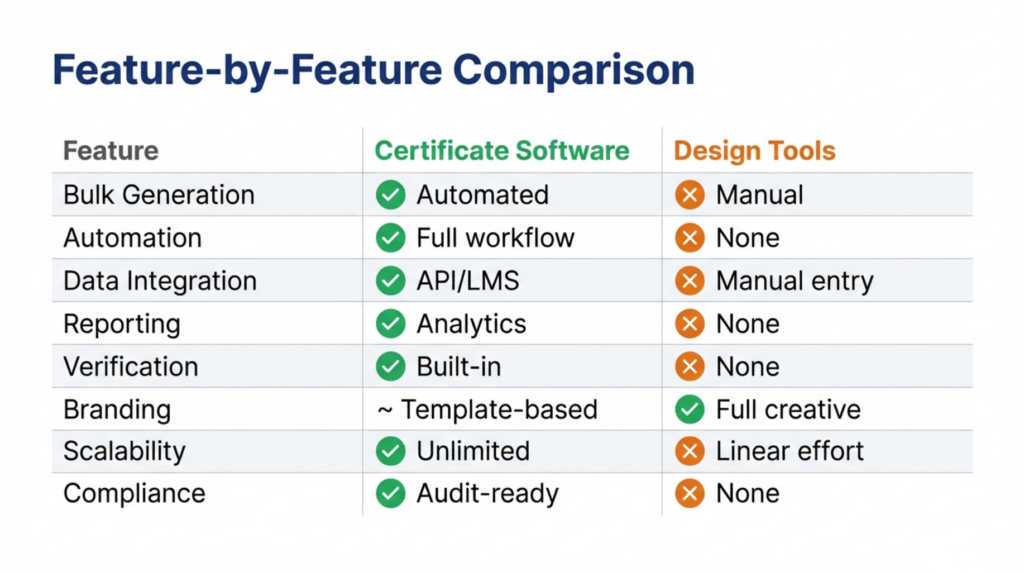
The functional gaps between design tools and certificate software become clear when examining specific capabilities required for professional credential programs.
Bulk Certificate Generation
Design tools require manual creation of each certificate or complex mail merge workflows that remain error-prone and time-consuming. Certificate software like MixCertificate processes hundreds or thousands of certificates simultaneously from a single data upload, applying consistent formatting automatically.
Automation Capabilities
Design tools offer no native automation for certificate workflows. Every step requires human intervention. Certificate software automates the entire flow from completion trigger through generation to delivery, eliminating manual touchpoints entirely.
Data Handling and Integration
Design tools accept manual data entry only. Certificate software integrates directly with learning management systems, HR platforms, and databases through APIs and webhooks, pulling learner information automatically without manual transfers.
Reporting and Analytics
Design tools provide no reporting on certificate issuance, access, or verification. Certificate software maintains detailed analytics on every credential issued, downloaded, verified, and shared, creating audit trails required for compliance.
Verification Infrastructure
Design tools produce static PDFs with no verification mechanism. Anyone can duplicate or alter them. Certificate software embeds unique verification links or QR codes in every certificate, allowing instant authenticity validation through secure databases.
Branding Customization
Design tools excel at visual customization with complete creative freedom. Certificate software offers template-based customization that balances brand control with scalability, though advanced platforms like MixCertificate provide extensive design flexibility within automated frameworks.
Scalability Under Load
Design tools slow linearly with volume – 100 certificates take 100 times longer than one certificate. Certificate software maintains consistent processing speed regardless of volume, generating 10 or 10,000 certificates in essentially the same timeframe.
Compliance Readiness
Design tools lack compliance features entirely. Certificate software includes expiration tracking, renewal workflows, audit logs, and retention policies required by regulated industries and professional certification bodies.
Automation Benefits of Certificate Software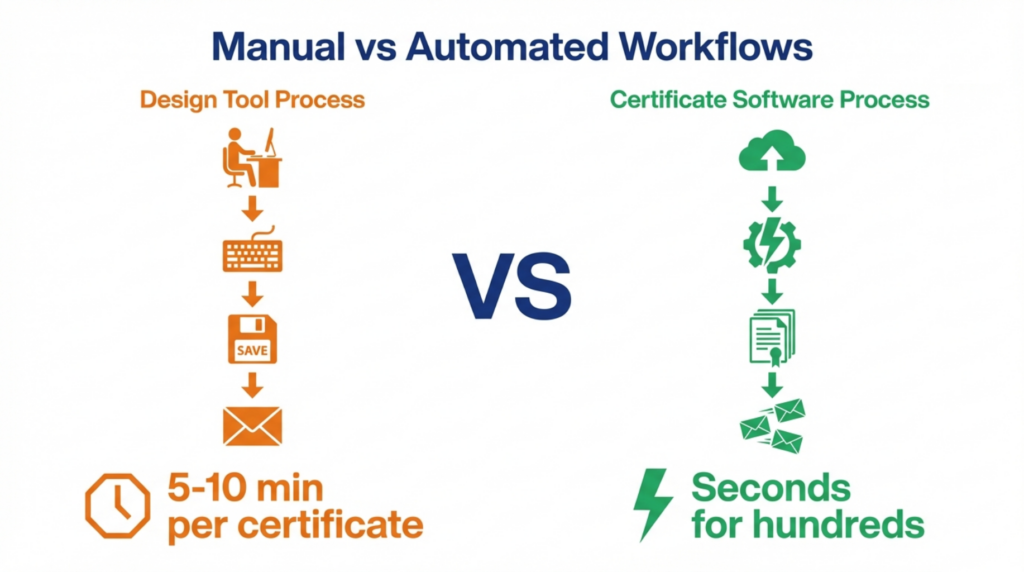
The efficiency gap between manual design tool workflows and automated certificate software becomes stark when examined through actual operational metrics.
Manual certificate creation through design tools typically requires 5-10 minutes per certificate including data entry, quality checking, export, and delivery. At 100 certificates monthly, this consumes 8-16 hours of staff time. At 500 certificates, the workload becomes untenable without dedicated personnel.
Automated certificate platforms reduce this to seconds per certificate regardless of volume. MixCertificate and similar systems process entire batches in the time previously required for a single manual certificate. Organizations report reducing certificate production time by 90-95% after switching from design tools to specialized software.
Beyond time savings, automation eliminates common errors. Manual data entry inevitably produces misspelled names, incorrect dates, and mismatched course information. Automated systems pull data directly from source systems, ensuring accuracy and consistency across every certificate issued.
Automation also enables immediate delivery. Design tool certificates require manual distribution after creation, creating delays between course completion and credential receipt. Automated platforms deliver certificates instantly upon triggering events, improving learner satisfaction and program completion rates.
Compliance and Record-Keeping Differences
Regulated industries and professional certification programs impose requirements that design tools cannot satisfy.
Training compliance mandates maintaining permanent records of who completed what training, when they completed it, and whether credentials remain valid. Design tools offer no record-keeping infrastructure. Organizations must build separate tracking systems, typically relying on spreadsheets that become unwieldy and unreliable at scale.
Certificate software maintains comprehensive databases linking every credential to the individual who earned it, the program they completed, completion dates, and verification history. When auditors request proof of training compliance, these systems generate reports instantly rather than requiring manual record reconstruction.
Expiration and renewal tracking presents another compliance challenge. Many certifications require periodic renewal to maintain validity. Design tools provide no mechanism for tracking expiration dates or triggering renewal notifications. Certificate software automates these workflows, alerting credential holders before expiration and facilitating renewal processes.
Audit trails document every action taken on each certificate from creation through verification requests. This level of documentation satisfies regulatory requirements in healthcare, finance, and other compliance-heavy sectors where design tools leave organizations exposed to audit failures.
When Design Tools Are Enough – And When They Are Not
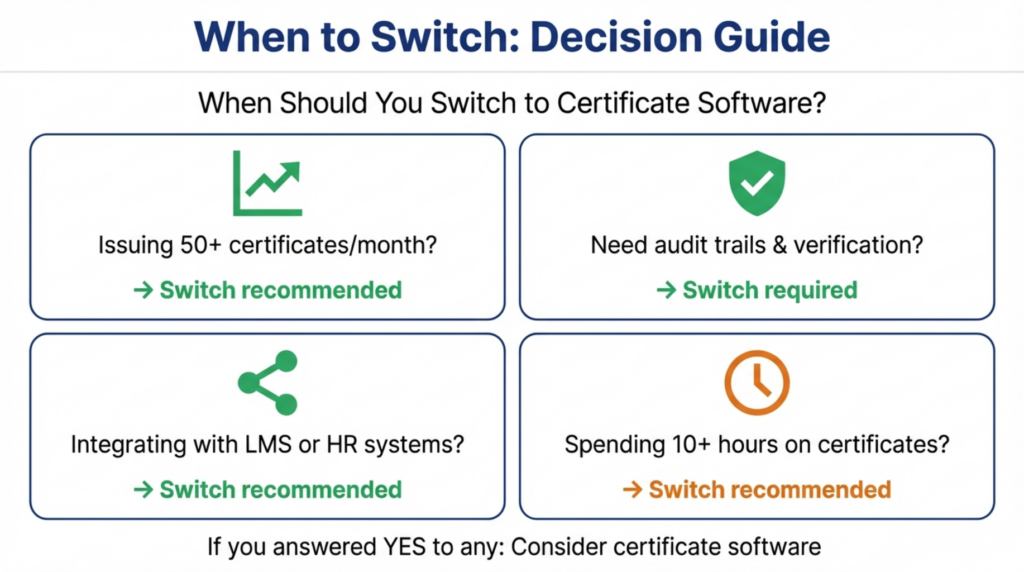
Design tools remain perfectly adequate for specific use cases, while becoming liabilities in others.
Small, one-time certificate needs suit design tools well. A single workshop with 15 participants can efficiently use Canva or PowerPoint for certificate creation. The time invested in learning specialized software wouldn’t justify the minimal volume.
Internal recognition certificates where verification doesn’t matter also work fine with design tools. Employee appreciation certificates or participation awards require visual appeal but not robust verification or compliance infrastructure.
However, growing training programs quickly outgrow design tool capabilities. When certificate volume exceeds 50 monthly, automation benefits justify platform investment. When programs require integration with learning management systems, design tools become bottlenecks preventing workflow efficiency.
Compliance-driven environments cannot rely on design tools at any scale. Healthcare continuing education, financial services training, manufacturing safety certifications, and professional licensure programs need verification infrastructure and audit trails that design software cannot provide.
External certification programs offering credentials to customers, partners, or public learners require professional-grade verification. Design tool certificates lack credibility in these contexts compared to credentials issued through dedicated platforms like MixCertificate that provide verification links and credential portability.
Who Should Use Certificate Software Instead of Design Tools?
Specific organizational roles and program types clearly benefit from migrating beyond design tools.
HR and L&D teams managing employee onboarding, compliance training, and professional development programs need automation and record-keeping that design tools cannot deliver. As employee populations grow beyond 100-200 people, manual certificate processes collapse under their own weight.
Training organizations offering courses to external audiences require verification infrastructure to maintain credential credibility. Design tool certificates lack the trust signals that learners expect from professional training providers.
Course creators operating at scale across platforms need integration capabilities to connect certificate issuance with course completion across learning management systems. Design tools cannot integrate with these platforms, forcing manual verification of completions before certificate generation.
Compliance-focused programs in regulated industries must maintain audit-ready records and provide verifiable proof of training completion. MixCertificate and similar platforms build these capabilities as core features rather than requiring organizations to construct them separately.
Educational institutions offering continuing education, professional development, or workforce training increasingly adopt certificate software to meet learner expectations for verifiable digital credentials that transfer across platforms and appear in professional profiles.
Pros and Cons: Certificate Software vs Design Tools
Understanding the trade-offs helps organizations make informed decisions about which approach suits their current and future needs.
Strengths of Design Tools
Design tools offer unmatched creative flexibility for certificate appearance. Teams can implement any visual design without technical constraints. The software typically costs less than specialized platforms, especially if organizations already own licenses for other purposes.
Learning curves remain minimal since most people have design tool experience. Teams can start creating certificates immediately without training on new platforms. For very small volumes, design tools provide faster time-to-first-certificate than learning specialized software.
Strengths of Certificate Software
Certificate platforms eliminate manual effort through automation, reducing labor costs despite higher software costs. They scale effortlessly from dozens to thousands of certificates without proportional workload increases.
Built-in verification prevents fraud and builds credential trust. Integration capabilities connect certificate issuance with existing systems, eliminating manual data transfers. Compliance features satisfy regulatory requirements that design tools cannot address.
Platforms like MixCertificate provide recipient portability, allowing credential holders to share verified certificates across professional networks and digital credential wallets beyond simple PDF attachments.
Trade-offs and Considerations
Certificate software requires initial setup and configuration time that design tools don’t. Organizations must invest in learning new platforms and potentially migrating existing certificate data.
However, this upfront investment pays ongoing dividends through eliminated manual work and reduced error rates. The crossover point typically occurs around 50-100 certificates monthly, where automation savings exceed platform costs.
Frequently Asked Questions (FAQs)
What is the difference between certificate software and design tools?
Certificate software provides purpose-built platforms for automated credential issuance, verification, and management at scale. Design tools offer general graphic creation capabilities requiring manual processes for each certificate. The primary distinction lies in automation, data integration, verification infrastructure, and compliance features that design tools lack entirely.
Is certificate software better than design tools for training?
Certificate software vs design tools suitability depends on program scale and requirements. For ongoing training programs issuing more than 50 certificates monthly, requiring verification, or needing compliance documentation, certificate software provides essential capabilities design tools cannot match. Small, one-time needs may still suit design tools adequately.
Can design tools handle bulk certificates?
Design tools can create multiple certificates through mail merge features or repeated manual processes, but these approaches remain error-prone and time-consuming. They lack true bulk automation, requiring significant manual effort regardless of volume. Certificate software generates thousands of certificates as easily as generating ten.
When should teams switch to certificate software?
Teams should consider switching when experiencing any of these indicators: spending more than 10 hours monthly on manual certificate creation, facing compliance audit requirements, needing credential verification capabilities, integrating certificates with learning management systems, or scaling beyond 50-100 certificates monthly.
Is certificate software required for compliance?
Regulated industries requiring audit trails, expiration tracking, and verifiable training records cannot achieve compliance using design tools alone. Certificate software provides the documentation infrastructure, verification systems, and record retention capabilities that compliance frameworks mandate. MixCertificate includes compliance-focused features designed specifically for regulated environments.
Does MixCertificate replace design tools entirely?
MixCertificate serves different purposes than general design tools. While it automates certificate workflows, maintains verification databases, and ensures compliance, organizations may still use design tools for other graphic needs. Some teams use design tools to create certificate templates that MixCertificate then automates and scales, combining the strengths of both approaches.
Conclusion
The certificate software vs design tools comparison reveals fundamentally different approaches to credential issuance. Design tools excel at creating visually appealing individual certificates through manual processes. Explore MixCertificate Pricing Plans for your organization and Certificate software automates entire credential workflows while adding verification, compliance, and integration capabilities that design platforms cannot provide.
Organizations beginning with design tools eventually confront scalability limits, compliance gaps, and manual workload that specialized platforms address. The migration typically occurs when certificate volume exceeds 50-100 monthly, when verification becomes important, or when compliance requirements emerge.
Platforms like MixCertificate represent the evolution beyond manual design processes toward automated credential ecosystems. While design tools remain appropriate for small-scale, informal needs, professional training programs increasingly require the automation, verification, and compliance infrastructure that only purpose-built certificate software can deliver.
