
Event organizers issue certificates for attendance, participation, continuing education credits, and professional development. The best certificate software for events automates this process, replacing manual PDF creation with systems that generate, brand, and distribute certificates to hundreds or thousands of attendees in minutes.
Events face unique certificate challenges. Attendees expect certificates immediately after sessions end. Manual creation delays distribution by days or weeks. Design tools like Canva work for small workshops but fail at conference scale. This guide compares certificate software solutions designed specifically for event needs.
What Is Certificate Software for Events?
Certificate software for events is a digital platform that automates certificate creation, branding, and distribution for event attendees. Instead of manually designing individual certificates, event teams upload attendee data and generate personalized certificates in bulk.
Event teams use the best certificate software for events to issue credentials for various purposes. Attendance certificates confirm participation in conferences or summits. Completion certificates verify workshop or training session attendance. Continuing education certificates document professional development hours for licensing requirements.
The key difference from manual certificate creation lies in speed and automation. Manual methods require designing each certificate individually, taking 8 to 12 minutes per attendee. Certificate software generates bulk credentials from spreadsheet data in minutes, enabling same-day distribution after events conclude.
Why Events Need Dedicated Certificate Software ?
Events operate under tight post-event timelines. Attendees expect certificates within hours or days of event completion, not weeks later. Delayed certificate delivery damages attendee satisfaction and reduces perceived event value.
Speed after event completion determines attendee experience. For a 500-attendee conference, manual certificate creation requires 65 to 100 hours of work. The best certificate software for events reduces this to 30 minutes, allowing same-day or next-day distribution while event enthusiasm remains high.
Automation for hundreds or thousands of attendees eliminates repetitive manual work. Upload attendee lists exported from registration systems, select certificate templates, and generate the entire batch automatically. This frees event staff to focus on post-event follow-up and future event planning.
Branding consistency matters for professional events. Each certificate represents the event brand and sponsors. Manual creation produces variations in logo placement, colors, and formatting. Certificate software ensures every certificate maintains identical branding regardless of batch size or which staff member processes attendees.
Verification for sponsors and employers protects event credibility. Sponsors investing in events want assurance certificates represent real attendance. Employers granting professional development time need to verify employee participation. Built-in verification through QR codes provides instant authentication without staff intervention.
Reduced post-event workload allows teams to close events efficiently. Certificate distribution often becomes a lingering task consuming weeks of administrative time. Automation completes certificate issuance in the same week as the event, enabling faster event closure and quicker transition to planning future events.
Common Certificate Methods Used by Event Organizers
Design Tools (Canva, PowerPoint)
Many event teams use Canva or PowerPoint for certificate creation. These tools offer complete design control, enabling custom layouts incorporating event branding, sponsor logos, and unique visual elements.
Branding strengths include unlimited customization. Designers can match certificates precisely to event themes, color schemes, and brand guidelines. This appeals to events with strong visual identities or unique certificate requirements.
However, limitations emerge at scale. Each certificate requires manual editing, taking 8 to 12 minutes per attendee. For a 200-person workshop, this translates to 26 to 40 hours of work. Design tools provide no automation, no verification mechanism, and no centralized record management.
Manual PDFs & Spreadsheets
Basic workflows combine PDF templates with mail merge functionality. Event teams maintain attendee data in spreadsheets and manually merge information into certificate templates. This approach works for very small events under 50 attendees.
CSV-based workflows require technical setup and careful data formatting. Each merge operation risks errors from incorrect field mapping or data inconsistencies. Testing requires generating sample certificates and checking for formatting problems.
High error risk increases with attendee volume. Manual data entry introduces typos in names and session titles. A single spreadsheet error propagates across multiple certificates, requiring batch regeneration. Time consumption scales linearly, making this approach impractical for conferences exceeding 100 attendees.
Dedicated Certificate Software
Automated issuance transforms certificate distribution into a streamlined process. Upload a CSV file with attendee data, select pre-designed templates, and generate entire batches in minutes. The software validates data before generation, preventing errors from incomplete or incorrect information.
Verification happens automatically through QR codes or unique certificate URLs. Attendees can prove participation to employers by sharing verifiable digital certificates. Sponsors can confirm attendance figures through verification portal analytics.
Centralized management provides complete records of all issued certificates. Event managers can search by attendee name, session, or date. Attendees access certificates through email links, eliminating lost certificate problems and duplicate requests that burden event teams weeks after events end.
Feature-by-Feature Comparison for Events
| Feature | Design Tools (Canva/PPT) | Manual PDFs | Certificate Software |
|---|---|---|---|
| Bulk generation | No (one at a time) | Limited (mail merge) | Yes (1,000+ in minutes) |
| Automation | Manual each time | Semi-automated | Fully automated |
| Branding flexibility | Unlimited custom | Template-based | Template + customization |
| Email delivery | Manual individual sends | Manual batch send | Automated personalized |
| Verification links | None | None | QR codes, unique URLs |
| Scalability | Poor (linear time) | Limited | Excellent (any volume) |
| Post-event management | Local files only | Spreadsheet tracking | Cloud dashboard |
Bulk generation capability determines whether teams can issue certificates the same day events conclude. The best certificate software for events handles 1,000 attendees as efficiently as 100, while manual methods scale linearly with volume.
Automation integration with event registration systems eliminates data re-entry. Export attendee lists from platforms like Eventbrite or Cvent directly into certificate generation workflows, reducing manual work and error risk.
Branding flexibility ensures certificates reflect event identity while maintaining sponsor commitments. Software templates accommodate event logos, sponsor branding, speaker signatures, and custom layouts without requiring design expertise.
Email delivery automation distributes personalized certificates to hundreds of attendees simultaneously. Each email contains the recipient’s specific certificate with their name, sessions attended, and completion details.
Verification links protect event credibility by providing instant attendance confirmation. Platforms like MixCertificate include verification portals where employers or sponsors can confirm attendance without contacting event organizers.
Speed, Automation & Scale for Event Certificates
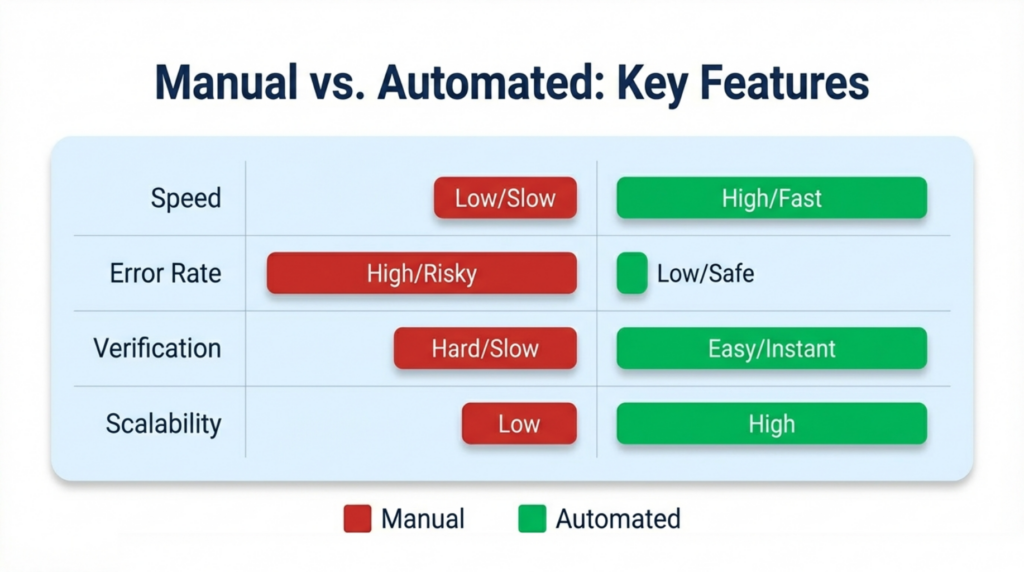
Manual workflows follow time-intensive paths. Event concludes, staff exports attendee data, designers create certificates individually, managers review for errors, and administrators distribute via email. This process takes days or weeks for large events.
Automated workflows connect directly to registration systems. When events conclude, organizers upload final attendee lists and generate certificates immediately. The entire process completes in hours, enabling same-day distribution while attendee engagement remains high.
Real-world timing examples demonstrate the difference. For 50 attendees, manual creation requires 6 to 10 hours versus 15 minutes with automation. For 1,000 attendees, manual approaches need 130 to 200 hours versus 20 to 40 minutes with certificate software.
Error reduction represents a critical advantage for professional events. Manual creation produces errors in 1 to 3 percent of certificates due to typing mistakes. The best certificate software for events validates data before generation, flagging missing information or incorrect formatting. Error rates drop below 0.1 percent.
Handling last-minute registrations becomes manageable with automation. Late registrants who complete payment hours before events start can receive certificates along with other attendees. Simply add their data to the spreadsheet and regenerate the batch, rather than creating individual certificates separately.
Branding & Professional Presentation
Event certificates serve as lasting brand touchpoints. Attendees display certificates in offices, share them on LinkedIn, and include them in professional portfolios. Quality presentation reflects event professionalism and enhances perceived value.
Consistent event branding across all certificates reinforces event identity. Colors, fonts, and layouts should match event marketing materials and website design. This consistency creates professional cohesion that attendees associate with high-quality events.
Sponsor logos, signatures, and layouts require careful placement. Sponsors often require logo inclusion on certificates as part of sponsorship agreements. Speaker signatures add authenticity to completion certificates. Professional layouts balance these elements without appearing cluttered.
Certificate design limitations in manual tools create challenges at scale. Maintaining exact logo placement, color matching, and signature positioning across hundreds of individual certificates proves difficult. Small variations compound, resulting in noticeably inconsistent certificate batches.
Certificate Verification & Event Credibility
According to PCMA research, continuing education verification is increasingly important for events.
Event certificates require verification to maintain credibility. Employers verify professional development claims before approving expense reimbursement. Licensing boards confirm continuing education credits before renewing certifications. Without reliable verification, certificates lose professional value.
Fake attendance claims damage event reputations. Individuals claiming event attendance without actually participating undermine event credibility when discovered. Employers encountering unverifiable certificates become skeptical of all event credentials, requiring verification for every claim.
QR codes provide instant verification through smartphone scanning. Each certificate contains a unique QR code linking to a verification portal. Employers scan the code and immediately see attendee name, event details, sessions attended, and confirmation of legitimate participation.
Verification URLs offer alternatives for environments without QR scanning capability. Certificates display unique URLs like verify.event.com/EVT-2025-12345. Verifiers visit this URL to confirm attendance details without contacting event organizers.
Employer and sponsor trust increases with verifiable certificates. Sponsors can independently verify attendance figures claimed in post-event reports. Employers confidently approve professional development requests knowing certificates include built-in verification.
Event Use Cases
Conferences & Summits
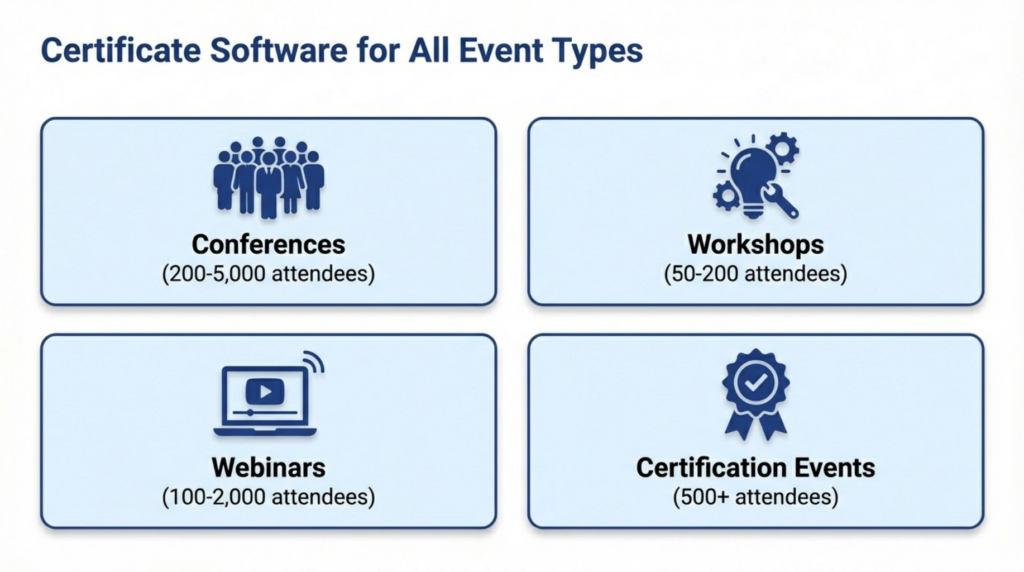
Multi-day conferences issue certificates for full attendance, individual sessions, or track completions. Volume ranges from 200 to 5,000 attendees depending on event size. Certificates often include continuing education credits requiring verification by licensing boards.
The rise of virtual event technology has increased certificate automation needs.
The best certificate software for events enables conference organizers to process entire attendee lists in single batches. Different certificate types for keynote-only versus full-conference attendees can be generated simultaneously using template variations.
Workshops & Bootcamps
Hands-on workshops and intensive bootcamps issue completion certificates verifying skill development or training completion. These certificates often carry professional significance, with attendees presenting them to employers or adding them to resumes.
Verification becomes essential for workshop certificates. Employers need to confirm employees completed claimed training. Certificate software with built-in verification eliminates weeks of phone calls and emails from HR departments seeking attendance confirmation.
Webinars & Virtual Events
Online events issue digital certificates for virtual attendance, webinar participation, and online course completion. Global attendee bases create demand for instant digital delivery without physical distribution requirements.
Digital certificate software supports virtual events by providing attendees immediate access through email links. No shipping delays or physical distribution costs. Attendees receive certificates within hours of webinar completion, maintaining engagement while event content remains fresh.
Professional Certification Events
Industry associations and professional organizations host events offering certification credits, continuing education units, or professional development hours. These credentials require strict verification and permanent record-keeping for regulatory compliance.
Verification features become mandatory for certification events. Licensing boards regularly verify continuing education claims. Platforms like MixCertificate maintain permanent verification records, supporting attendees who need to prove certification credits years after event attendance.
Pros and Cons of Certificate Software for Events
Advantages:
- Same-day or next-day certificate distribution after events
- Automated bulk generation for any attendee volume
- Consistent branding across all certificates
- Built-in verification for employer and sponsor trust
- Reduced post-event administrative workload
- Integration with registration platforms
- Permanent digital records eliminating lost certificates
- Professional presentation enhancing event value
Disadvantages:
- Platform costs (though often less than labor savings)
- Initial template setup time
- Less design flexibility than custom design tools
- Requires attendee data in structured format
- Learning curve for event teams
Best Certificate Software for Events (What to Look For)
Evaluation criteria should prioritize features specific to event workflows. Speed and automation matter most for post-event certificate issuance. The platform should generate and distribute certificates within hours of event conclusion, not days or weeks later.
Branding control ensures certificates represent event identity and sponsor commitments. Look for platforms supporting custom templates, logo uploads, multiple signature fields, and color customization. Templates should accommodate sponsor branding requirements without compromising design quality.
Verification features protect event credibility and attendee professional value. QR codes and unique certificate URLs should be standard, not optional add-ons. Verification portals must remain accessible permanently, not expire after subscription periods end.
Integration capabilities reduce manual work. Certificate software should accept CSV exports from common registration platforms like Eventbrite, Cvent, and Zoom. Direct API integrations automate the entire workflow from event completion to certificate delivery.
Pricing transparency matters for event budgets. Look for clear per-event or per-certificate pricing rather than hidden fees or complex tier structures. MixCertificate represents one example offering transparent pricing and event-focused features, though organizers should evaluate multiple options based on specific event requirements.
Which Certificate Software Is Right for Your Event?
Small workshops issuing under 100 certificates benefit from platforms with pay-per-use pricing or generous free tiers. Manual methods might seem acceptable at this scale, but automation still saves 8 to 15 hours while improving attendee experience through faster delivery.
Multi-day conferences processing 200 to 2,000 certificates require reliable automation and verification. Labor savings become substantial at this volume, easily justifying platform costs. Same-day certificate distribution enhances attendee satisfaction and perceived event value.
Virtual events prioritize immediate digital delivery and global accessibility. Certificate software should integrate with webinar platforms to automatically generate certificates upon session completion. Attendees expect instant access through email links without waiting for manual processing.
High-volume annual events issuing 2,000 to 10,000 certificates annually need enterprise-grade reliability and scalability. Verification becomes critical given the volume of employer and sponsor verification requests. Permanent record storage supports attendees needing to prove attendance years after events conclude.
Frequently Asked Questions
What is the best certificate software for events?
The best certificate software for events depends on event size, frequency, and verification requirements. Platforms offering bulk generation, automation, and verification work well for most professional events. Evaluate software based on your typical attendee volume, branding needs, and post-event timeline requirements.
Can event certificates be automated?
Yes, event certificates can be fully automated using dedicated certificate software. Upload attendee data in CSV format, select templates, and generate hundreds or thousands of certificates in minutes. Automation reduces post-event certificate work from days or weeks to under one hour for large events.
How fast can certificates be issued after an event?
With the best certificate software for events, certificates can be issued within 1 to 3 hours after event conclusion. Upload final attendee lists, generate the batch, and distribute via automated email. Manual methods require days or weeks for the same volume.
Is certificate software better than PDFs for events?
Certificate software offers significant advantages over manual PDFs for events with more than 50 attendees. Software provides bulk generation, automated verification, and same-day distribution that PDFs cannot match. Manual PDFs work only for very small workshops under 30 attendees.
Do event certificates need verification?
Event certificates increasingly require verification as employers and sponsors demand attendance confirmation. Without built-in verification, organizers must manually respond to verification requests for months or years after events. Automated verification eliminates this ongoing workload while protecting event credibility.
Can certificate software handle sponsor branding?
Yes, most certificate platforms support sponsor branding through custom templates. Upload sponsor logos, add multiple signature fields for speakers or organizers, and customize layouts. Templates can accommodate various sponsor branding requirements while maintaining design consistency across all certificates.
How many attendees justify using certificate software?
Events with 50 or more attendees benefit from certificate software. Time savings begin immediately, with labor reductions of 6 to 10 hours even at small volumes. At 200 attendees, annual time savings reach 25 to 40 hours of post-event administrative work per event.
Conclusion
Compare pricing plans for event certificate software.
The best certificate software for events transforms certificate issuance from a time-consuming post-event burden into an automated workflow completing in hours. Event organizers issuing certificates to 50 or more attendees benefit from same-day distribution, verification systems, and reduced administrative workload.
Evaluation should focus on speed, automation, and verification features. Compare platforms based on your typical event size, branding requirements, and post-event timeline expectations. The best certificate software for events enables professional certificate delivery while event enthusiasm remains high, enhancing overall attendee experience and perceived event value.
